Monday, 5 January 2015
Thursday, 18 December 2014
ughjhhjh
determine WebPAS message type;
In MSH segment check the 9th field, this is meant to contain
<message type (ID)> ^ <trigger event (ID)>
(see https://www.hl7.org/documentcenter/public_temp_B5A64101-1C23-BA17-0C953B25BD420909/wg/conf/HL7MSH.htm)
our PAS is a knob and has it like this instead:
Message
|
Description
|
Message Type
|
A01
|
Admit a Patient
|
ADT^A01^ADT_A01
|
A02
|
Transfer a Patient
|
ADT^A02^ADT_A02
|
A03
|
Discharge a Patient
|
ADT^A03^ADT_A03
|
A05
|
Pre-admit a Patient
|
ADT^A05^ADT_A01
|
A08
|
Update patient Information
|
ADT^A08^ADT_A01
|
A11
|
Cancel Admit
|
ADT^A11^ADT_A09
|
A12
|
Cancel Transfer
|
ADT^A12^ADT_A12
|
A13
|
Cancel Discharge
|
ADT^A13^ADT_A01
|
A14
|
Pending Pre-Admission
|
ADT^A14^ADT_A01
|
A21
|
On Leave
|
ADT^A21^ADT_A02
|
A22
|
Return from Leave
|
ADT^A22^ADT_A02
|
A27
|
Cancel Pending
Pre-Admission
|
ADT^A27^ADT_A02
|
A28
|
Add Person Information
|
ADT^A28^ADT_A28
|
A31
|
Update person Information
|
ADT^A31^ADT_A01
OR
ADT^Axx^ADT_01 when using
alternate “A” message
|
A34
|
Merge Person Information
(Patient ID Only)
|
ADT^A34^ADT_A30
|
A44
|
Change U/R for a Visit
|
ADT^A44^ADT_A43
|
M02
|
Practitioner Message
|
MFN^M02^MFN_M02
|
S12
|
Notification of New Appointment Booking
|
SIU^S12^SIU_S12
|
S14
|
Notification of Appointment Modification
|
SIU^S14^SIU_S12
|
S15
|
Notification of Appointment Cancellation
|
SIU^S15^SIU_S12
|
Just check the first two fields. The second appears to indicate the event that raised the message, for example admitting someone in PAS (admission event = A01) may send out:
preadmit message ADT^A05^ADT_A01
then update patient info ADT^A31^ADT_A01
then admission message ADT^A01^ADT_A01
The ADT events we mostly care about:
A01 Admit / visit notification
A02 Transfer a patient
A03 Discharge/end visit
A04 Registration (e.g. ED visit where not admitted)
A05 Pre-admit a patient
A08 Update patient information
A18 Merge patient information
A19 QRY/ADR - Patient query
A31 Update person information
A34 Merge patient information - patient I
full list
Sunday, 14 December 2014
The ED Whiteboard thing
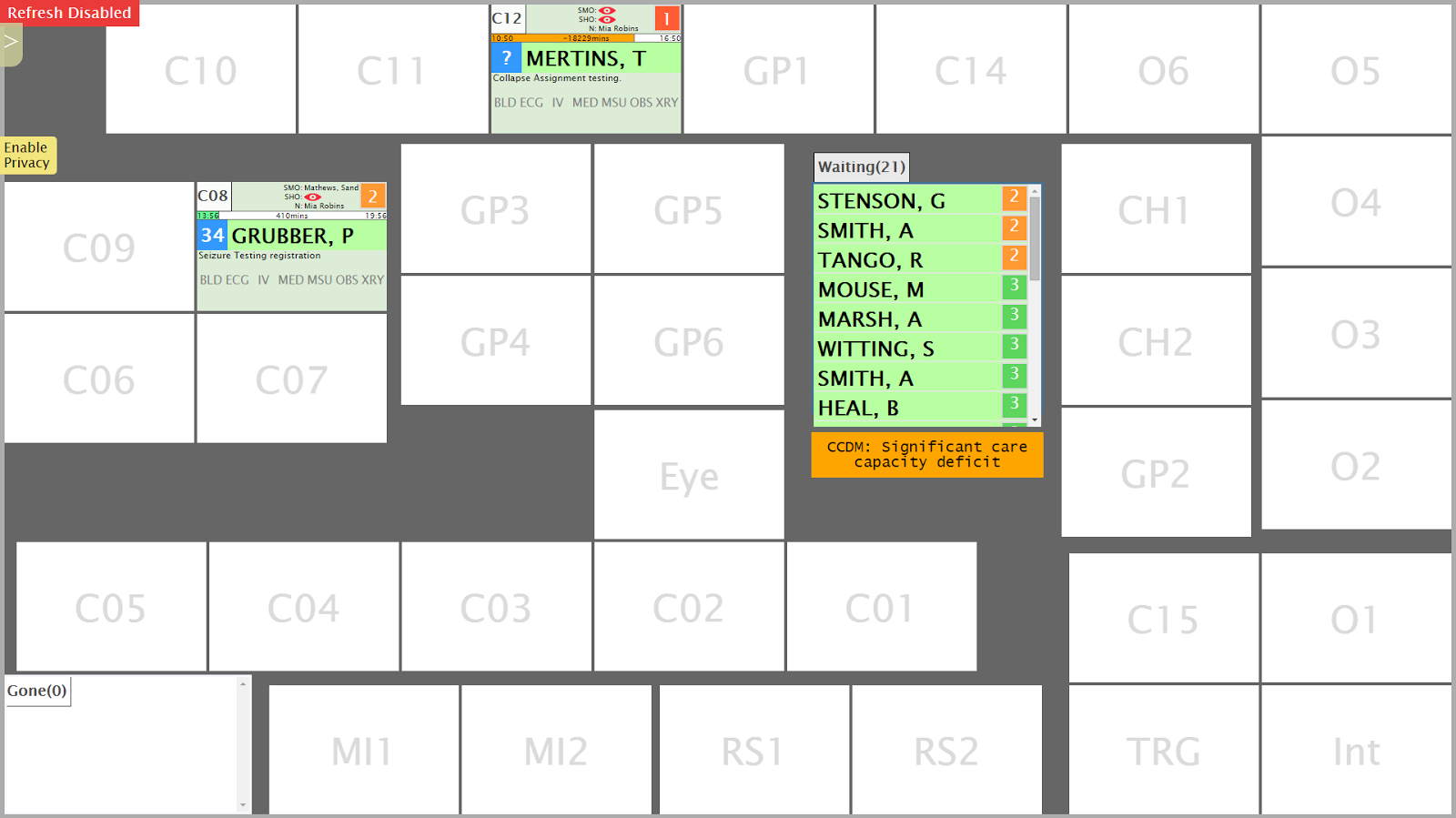
Ok, here is the ED whiteboard* overview:
(* calling it a whiteboard is kind of misleading, it's just called that because it replaces a real whiteboard that people draw on with those nice smelling pens I covertly sniff while in meetings. It's probably better described as a ward & patient overview screen)
There are a heap of boxes. Each box represents a bed. These are laid out the same as the ED ward (i.e. this is basically a map of the ED). These run on two 47 inch touchscreen monitors in the ward.
You are thrilled I am sure.
Reasons for having a map view rather than a big ol' table/grid:
The big list of patients is all the folks who have been through triage and are in the PAS. You smush your greasy finger against one of these patients and then smush it against one of the empty boxes. This moves the patient! Touchscreens huh, truly we are living in the future.
When the patient is in a room (or 'location', cause they aren't all rooms; some are chairs, some are just empty spots in the corridor (I am actually not joking)) you can see some more data about that patient:
It sure looks like a mess doesn't it. It all is Very Important Information that I can't be bothered 'splaining right now. Additionally, if you then smush your finger against a patient twice it will open a pop-up window:
Because doctors like to order things and have data their own way, the same data from the above is accessible through the clinical portal (concerto) in a grid:
Because I hate grids I made it not really look like a grid and instead look like a stack of sausages because I do like sausages.
Reasons for having a grid:
Click columns to sort the grid, or do advanced sorting which is still just clicking columns, but more than one column
And in a travesty of design you can also open the filters which should totally be attached to the column headers but aren't because I like to reinvent the wheel and confuse the users and also partly because I ran out of time
(* calling it a whiteboard is kind of misleading, it's just called that because it replaces a real whiteboard that people draw on with those nice smelling pens I covertly sniff while in meetings. It's probably better described as a ward & patient overview screen)
There are a heap of boxes. Each box represents a bed. These are laid out the same as the ED ward (i.e. this is basically a map of the ED). These run on two 47 inch touchscreen monitors in the ward.
You are thrilled I am sure.
Reasons for having a map view rather than a big ol' table/grid:
- Can see wards status (e.g. occupancy) at a glance
- Easy to locate empty beds or areas that normally shouldn't be filled (overflow areas)
- Groups a patient's data together rather than smearing it across the page in a giant table
- It's in the requirements :/
The big list of patients is all the folks who have been through triage and are in the PAS. You smush your greasy finger against one of these patients and then smush it against one of the empty boxes. This moves the patient! Touchscreens huh, truly we are living in the future.
When the patient is in a room (or 'location', cause they aren't all rooms; some are chairs, some are just empty spots in the corridor (I am actually not joking)) you can see some more data about that patient:
It sure looks like a mess doesn't it. It all is Very Important Information that I can't be bothered 'splaining right now. Additionally, if you then smush your finger against a patient twice it will open a pop-up window:
Because doctors like to order things and have data their own way, the same data from the above is accessible through the clinical portal (concerto) in a grid:
Because I hate grids I made it not really look like a grid and instead look like a stack of sausages because I do like sausages.
Reasons for having a grid:
- Access the data through portal - cramming a map view on a desktop screen is madness
- You can order it however you want, e.g. show most urgent triage value at top
Click columns to sort the grid, or do advanced sorting which is still just clicking columns, but more than one column
And in a travesty of design you can also open the filters which should totally be attached to the column headers but aren't because I like to reinvent the wheel and confuse the users and also partly because I ran out of time
Wednesday, 12 November 2014
Scheduling a service to stop and start
I lol at the vendor windows service that dies but appears to still be running from the services window.
- Create a stupid bat file to stop the task with the contents of
NET STOP "ServiceNameGoesHere" - Create a stupid bat file to start the task with the contents of
NET START "ServiceNameGoesHere" - Create a scheduled task to run the first bat.
- Create a scheduled task to run the second bat a few minutes later.
- Does this really need a post, am I really going to forget this? Probably.
Notes:
- Use a domain user to run the tasks because it just doesn't want to work otherwise
- Make sure the user has the log on as batch thing (http://www.power-programming.co.uk/post/2010/11/18/Task-Scheduler-This-task-requires-that-the-user-account-specified-has-Log-on-as-batch-job-rights.aspx)
- The dudes on the internet reckon you might need to make the user an admin (I didn't)
- The dudes on the internet reckon you might need to explicitly give the user Full Access to the folder and .bat even if they are an admin (I didn't)
Tuesday, 11 November 2014
Tuesday, 12 August 2014
Wednesday, 6 August 2014
Config for getting GitHub going at work that I always forget
GitHub, you make me so :/
How to set proxy:
How to unset proxy:
Stop the 'fatal: unable to access 'https:github.com/[whatever]/' : SSL certificate problem: unable to get local issuer certificate::
How to set proxy:
git config --global http.proxy http://user:password@proxyname:port
How to unset proxy:
git config --global --unset http.proxy
Stop the 'fatal: unable to access 'https:github.com/[whatever]/' : SSL certificate problem: unable to get local issuer certificate::
git config -- global http.sslVerify false
Subscribe to:
Comments (Atom)