Tuesday, 6 February 2018

Versioning in REST

Details at
https://github.com/Microsoft/aspnet-api-versioning/wiki

Add the nuget package


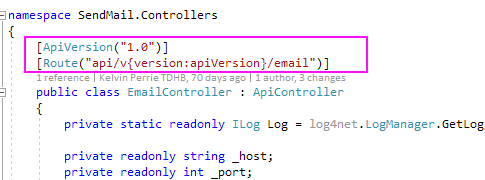
Decorate the controller


Access the API using the new path (described in the values that decorate the controller), e.g. http://whatever/api/v1.0/email

Can test using Swagger. Install Swashbuckle nuget package. Run your project and go to your URL with swagger on the end, e.g. 
http://localhost:10539/swagger
which will redirect to http://localhost:10539/swagger/ui/index
This lists your controllers.

Click the one you want to test and available actions are shown. The non-versioned one will not work. 


Click the one with the version in the URL. Enter params where required and click 'try it out!'.

Confirm the response is ok.


Edit:

The WebApiConfig should be updated automatiically(?) but sometimes isn't?

The error:
The inline constraint resolver of type 'DefaultInlineConstraintResolver' was unable to resolve the following inline constraint: 'apiVersion'

Mean you need to resolve the apiVersion value in WebApiConfig; it should look something like

            // Web API routes
            var constraintResolver = new DefaultInlineConstraintResolver()
            {
                ConstraintMap =
                {
                    ["apiVersion"] = typeof( ApiVersionRouteConstraint )
                }
            };
            config.MapHttpAttributeRoutes(constraintResolver);
            config.AddApiVersioning();

            config.Routes.MapHttpRoute(
                name: "DefaultApi",
                routeTemplate: "api/{controller}/{id}",
                defaults: new { id = RouteParameter.Optional }
            ); 

Oracle.ManagedDataAccess - accessing Oracle from .Net without having to install any Oracle client


"ODP.NET, Managed Driver is a 100% native .NET code driver. No additional Oracle Client software is required to be installed to connect to Oracle Database."

Add this nuget package:


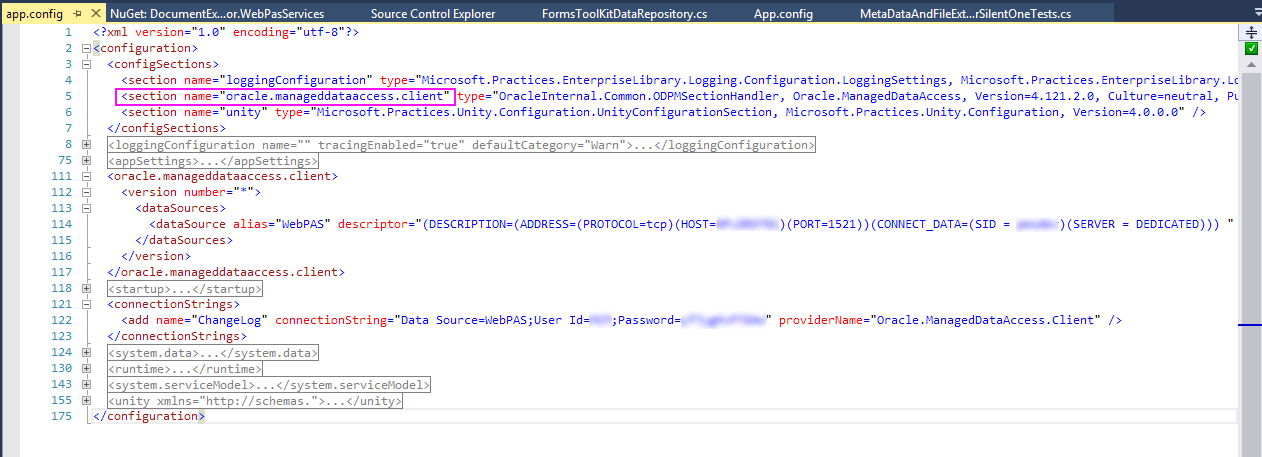
Stuff gets added to config; configure connection

Have had a problem when multiple connection strings with them not reading from the aliased data source. Can skip the datasource config elements and put it directly into the connection string.

Accessing the connection string as per standard


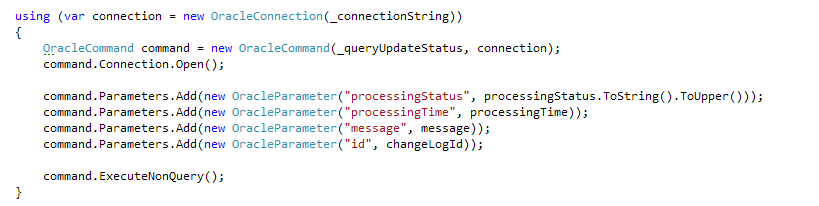
Use the OracleCommand same way as SqlCommand. To issue command (e.g. update):

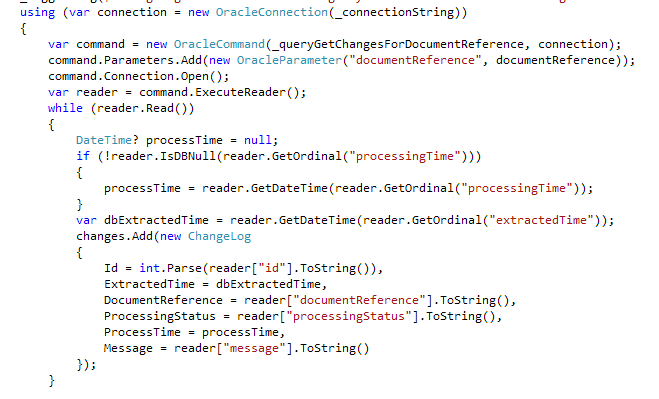
or to read data (e.g. select):


Parameters in the query are prefixed with colon:


NOTE: Ensure that the params added in the code (e.g. using the command.Parameters.Add) are done in the same order as they occur in the query. Even though a name is specified when adding a parameter, by default that is ignored.

TFS 2017 build & release with config transforms

I love config transforms. I do not love TFS environment variables.

These are notes on how to have two builds (debug and release) but multiple target environments (e.g. dev, test and prod) with different web.config settings applied during the release steps (which is done by web.config transforms).

The high level process is:

  • Setup a debug and release build. The debug build of the code goes to dev server, the release build goes to test and prod servers.
  • During the release to each environment the config transforms are applied to ensure the config is relevant to the environment it is going to (e.g. connects to right database/webservices, has right app settings)
You can do transforms during the build stage, but doing it during the release phase is better because:


  1. The code going to both test and prod is identical (with an altered config). 
  2. You don't have to do a build for each environment. You can just do a debug and release build which is quicker if you have a lot of environments
  3. You don't have to change the project file to add in a transform step. That step will actually apply to local builds which is a pain (you can create a 'localdebug' config and use that local but who can be bothered). Although I guess you could do an XDT Transform step during your build without changing the proj file (haven't tried this, but should work).


Do the build


Setup the BuildConfiguration to do a debug and release build by updating BuildConfiguration variable and turning on multi-configuration.


Configure artifact names so the different builds can be distinguished:

This means two builds happen:


Wow.

Do the release

The artifact can be copied to the final website location (e.g. the IIS directory) and the config transform applied there, but there will be a short time where the code will be deployed and the transform not applied - for that time users accessing will get the site with non-transformed (e.g. development) config. So process is: 
  1. stick the artifact files in a temp/working directory
  2. do the transform for the environment
  3. move the files to the final website directory

Create release definition(s)

Copy the files from the artifact to a working directory (create the directory manually (or add a step to do it) first or this copy step will fail)

Apply the config transform to the files in the working directory (this comes from the marketplace https://marketplace.visualstudio.com/items?itemName=qetza.xdttransform#overview)
How does this work when it doesn't have any credentials associated with the step? Dunno. Maybe because the previous copy files step does pass credentials, so the process is already considered authorised on the remove machine.


Copy the files from the working directory to the website directory


Optional: delete the config transforms and clean the working directory:
You have to get the remote delete step from the marketplace. There is a bug with it where if your path has a space you need to wrap it in single quotes.

Tuesday, 12 September 2017

phoenix project notes


The first way.
Moving work from left to right; dev to ops to customer. Small batch sizes and intervals of work. No defects going downstream. Optimise for global goals (rather than local like feature completion, all bugs fixed).

Continuous build, integration and deployment. Limiting work in progress.

The second way.
Getting fast feedback from right to left (customer -> dev).

The improvement of daily work over daily work. Automated test suites. Pervasive telemetry to see how code operating & meeting customer goals.

The third way.
Culture of two things; 1. Constant experimentation (and risk), learning from success and failure. Improving the flow of work. 2. Repetition and practice to master skills.

Culture of high trust. Time allocated for non-functional requirements. Encourage improvements.

The four types of work:
1. Business projects
2. Internal projects
3. Changes
4. Unplanned work

Sunday, 30 April 2017

TFS 2015 build configurations and config transforms

How to get the same code deployed to different environments but deploy debug builds to dev and release builds to prod (and additional builds to other environments), also taking into account configuration transformations.


Using the Configuration Manager in Visual Studio setup the appropriate configurations e.g. add a Test configuration. Debug goes to dev, Test goes to test, Release goes to production. Test and Release should have the same build configuration (if you want test environment code same as prod env code) but will have different config transforms applied (e.g. the connection strings for dbs will be different).


In Visual Studio go to the Build tab on the project properties and configure each configuration e.g. make the test configuration the same as the release configuration


Add any additional web.config transform files that are needed.  For a web.config you can right click. For an app.config project add each file manually, then unload the project file and edit it.  Make each of the transforms dependent on the app.config file.


Update the transform configs to have environment specific values; the application of these are controlled by the transform attributes. Only include elements that need to be changed. Items in transform will be merged into the original config i.e. you don't have to repeat data in here that isn't changing


In TFS config transforms will not happen automatically. To get this to work we manually add a step into the project file. This won't effect local builds. In Visual Studio unload the project. Edit the project file and add the transform step - it differs for app.config and web.config so add appropriately.

Web.config

  <UsingTask TaskName="TransformXml" AssemblyFile="$(MSBuildExtensionsPath)\Microsoft\VisualStudio\v$(VisualStudioVersion)\Web\Microsoft.Web.Publishing.Tasks.dll" />
  <Target Name="ApplyTransform" Condition="Exists('Web.$(Configuration).config')">
    <TransformXml Source="web.config" Transform="Web.$(Configuration).config" Destination="Web.config" />
  </Target>
  <Target Name="BeforeBuild">
    <Exec Command="attrib -r Web.config" />
    <CallTarget Targets="ApplyTransform" />
  </Target>


  <UsingTask TaskName="TransformXml" AssemblyFile="$(MSBuildExtensionsPath)\Microsoft\VisualStudio\v$(VisualStudioVersion)\Web\Microsoft.Web.Publishing.Tasks.dll" />
  <Target Name="AfterCompile" Condition="exists('app.$(Configuration).config')">
    <!-- Generate transformed app config in the intermediate directory -->
    <TransformXml Source="app.config" Destination="$(IntermediateOutputPath)$(TargetFileName).config" Transform="app.$(Configuration).config" />
    <!-- Force build process to use the transformed configuration file from now on. -->
    <ItemGroup>
      <AppConfigWithTargetPath Remove="app.config" />
      <AppConfigWithTargetPath Include="$(IntermediateOutputPath)$(TargetFileName).config">
        <TargetPath>$(TargetFileName).config</TargetPath>
      </AppConfigWithTargetPath>
    </ItemGroup>
  </Target>


Create a build for the solution in TFS.  There is a variable on the build called BuildConfiguration - every time this build is run it will compile the code using that configuration. E.g. if it is set to debug then the debug code will be what is released (i.e. it will go to dev, test and prod :( ).
To make TFS build all configurations from the same code set update the BuildConfiguration to be debug,test,release (a comma delimited list)


On the Options tab select the 'Multi-configuration' option, and in Multipliers enter the value BuildConfiguration


On the Copy Files action make the target folder contain the value of the BuildConfiguration (each in their own dir)


On the Publish Build Artifacts action but the BuildConfiguration value into the artifact name


When the build is run it will do a build for all three configurations


Three properly named artifacts will be created


On the release each environment has a file copy action with the source (and target) being different for each environment. This will copy everything. This could be better.


Sources:
http://stackoverflow.com/questions/3004210/app-config-transformation-for-projects-which-are-not-web-projects-in-visual-stud
http://stackoverflow.com/questions/8082662/how-to-select-different-app-config-for-several-build-configurations
https://codepunk.io/team-foundation-server-build-and-release-with-web-config-transforms/

Sunday, 30 October 2016

Microsoft Ignite New Zealand 2016 session reviews


Session reviews. reviews? reviews.

Tuesday


M200 An Intro to the SharePoint Framework Development Model - Gavin Barron


  • Currently only cloud (e.g. a waste of time) but may be on-premises at some point
  • can use the SharePoint workbench to develop without having SP installed
  • The Office UI Framework can be used to style things like office (lol)
  • All this stuff is done in Typescript which goes to our friend Javascript
  • Not sure if this is totally released yet ...

M308 High Availablility With SQL Server 2016 + always on availability groups - Warwick Rudd

  • 2016 = x64 = yay
  • Availability groups are included in standard edition, but are limited to replicating current database mirroring i.e. standard has less options
  • Single DB causes entire group to fail over (good)
  • This guy is really knowledgeable & is a good speaker but most of this is beyond me. Recommend for DBA

M310 From Zero to Power BI superhero - Dandy Weyn

  • Data is imported into Power BI Desktop and refreshed at set times (or direct Query or live/exploration -> can only do over SQL Analysis Server data source)
  • When you change the data set e.g. rename a column, it makes a history of changes. When data is refreshed it plays those changes over the new data
  • Mostly this is kind of vague

Wednesday


M317 Power BI for Developers - An Introduction to the API, the new Custom Visual SDK and Power BI Embedded - John Gallant


  • This is for the cloud, but there is a desktop version of Power BI
  • Custom visuals use node.js; need to install Power BI visuals SDK & install a local cert. These are just js with a power BI wrapper.
  • Power BI (in cloud) looks back to local machine to load stuff in dev e.g. /localhost:8080/
  • Lots of steps on his blogs about how to build custom visuals!
  • Somehow this was really interesting. Good speaker.

M321 DevOps in the real world: a true story - James Carpinter


  • details on what worked for them with modern software lifecycle etc
  • encourage VSTS as source of truth
  • can send a 'request feedback' from VSTS
  • there is a browser plugin for peeps without VSTS so they can provide feedback etc
  • Use branches a lot! every dev has own branch. Branch per workitem?
  • No transforms, branch per env
  • A lot of Azure focus (pffftt) but still really interesting. 

M328 From zero to DevOps - Donovan Brown


  • he reckons in theory we can write code well now (e.g. agile) so devops is deploying (& automating that) that code well
  • "DevOps is the union of people, process, and products to enable continuous delivery of value to our end users"
  • good overview, good speaker, some good slides on what part of devops use what technologies
  • investigate SSDT for db version + deployment control!
  • monitoring via Application Insights
  • This dude is super keen on automation, demo automatically created devops pipeline

M331 Deep Dive into the Microsoft Graph API - Andrew Coates


  • Office 365 related - connecting to office services
  • Graph is a single API (a wrapper) to all office apps
  • What - access data / traversing data (links between apps) / insights - this is like 'big brother' connections for people and data
  • I think this is all accessed via graph.microsoft.io
  • can do things like access fields in an excel spreadsheet, update outlook appointments

M335 Cryptolockers, CEO Fraud, DDoS extortion + cyber nasties - Andy Prow + Kirk Jackson


  • Interesting + informative + good speakers. Probably more for system engineers.

M344 The Power of Roslyn: Improving your productivity with live code analyizers - Kassey Uhlenhuth

  • JS talk was cancelled so I went to this!
  • Roslyn was released in VS 2015, along with C#6. C#7 is almost out in vs next (or vs15)
  • Analysers identify errors and help provide fixes in code as you type. Bascially like rehsarper does. Can popup suggestions.
  • A lot of resharper stuff has already been rewritten in this - you have to install em though (via nuget or VSIX)
  • Can create errors, warnings or suggestions
  • Will be out-of-process in v.next = better performance
  • debugging will start a new instance of visual studio with your analyser as a VSIX installed
  • Entertaining + interesting + good presentation
  • Loads of code in this :)

Thursday


M350 Internet Explorer and Edge in the Enterprise - Alan Burchill + Chris Jackson


  • Average age of webapps = 12 years. 50% code in enterprise is VB6
  • Edge = better security. isolation of tabs and content on tabes e.g. flash.
  • IE11 is not moving forward so support for ECMA 6 not progressing, gotta go to edge at some point
  • less group policies in edge because so many in ie11 that it created confusion + lots of permutations of configuration which made testing really difficult
  • IE and edge will wait 70 seconds after startup before downloading the enterprise list???????????????????????
  • Very interesting talk + good presentation

M232 Being Your Authentic Self - Dr Harold Hillman


  • JS talk cancelled so went to this ...
  • Good talk, interesting etc, not technical at all

M360 Property based testing with XUnit + FsCheck - Ivan Towlson


  • Property based testing: multiple inputs, the asserts describe what the results should look like i.e. the constraints rather than comparing actual values
  • inputs are rnadomly generated - incase of failure further tests are generated in a way to 'shrink' aka simplify the input - e.g. smaller input values
  • apply domain logic - expected ranges, values that should never be seen, relationships between inputs and outputs
  • interesting talk + good presentation, would recommend

M361 .Net Core for .Net developers - Bruno Tagliapietra


  • Omisharp addes .net editing functionality to VS Code. Yoeman can be used for scaffolding. What????
  • Deployment : framework dependant deploy = .net installed on server/target. Self-contained deployment = framework goes with the sapp.
  • demo of compile on windows and running on linux
  • demo of asp.net core running in a docker container with remote degugguing
  • Quite confusing overall. 

M369 Building cross-platform mobile applications with Xamarin and the Mircrosoft Graph - Andrew Coates


  • Can get an SDK for Xamarin (and some other stuff?) to use the graph rest API
  • graph is on azure, can you get it on premises?????
  • using xamarin/visual studio MVVM is a good model to follow
  • bit boring, kind of entertaining, not sure how relevant

M374 Boom! Compelling Visualisations with SQL Server - Rob Hawthorne

  • appears to apply to SSRS 2016 - at least there is a heap of new stuff
  • reporting services vs power bi. SSRS for paginated reports (aka corporate or big grids of data), single page/image heavy reports use power bi. cannot drill down easily/effectivley in power bi
  • can now publish power bi internally
  • kind of interesting, lots of folk asking questions, bit weird, not much flow due to all the questions

Friday


M380 C# and Visual Basic Code-focused Development with Visual Studio "15" - Kasey Uhlenhuth


  • Interactive Window! VS2015 update 1 + 2. Load with project context will put all refs of current project in interactive window. Proj doesn't have to be running.
  • VS2012 = C#6 vs VS2015(vs.next) = C#7
  • native ctrl T now! bye bye resharper?
  • ctrl dot will open the lightbulb (fixes) menu. REMEMBER THIS ONE!
  • use the ctrl. when things selected or when in code block or method signature
  • vs15 will do spelling mistakes. hmmm
  • ctrl. will install nuget packages on unrecognised types
  • VS2015 was all about compacting code + making more readable (this is when roslyn came out). It had:
  • the string format vs $
  • expression bodied methods = mthods with single line can use the =>
  • null conditional opperator
  • VS next is all about working with data. It has:
  • can return tuples (multiple return types) from a method. You can name the members in a tuple.
  • pattern matching - checking types (e.g. if have base, checking inh). e.g. if(p is Student || p is Teacher) {      when student and teacher are types
  • local functions - put functions in functions - these can access vars in parent scope.
  • Performance enhancements are coming
  • The version of C# depends on the compiler, the tooling support is based on the IDE.

M384 Beyond T-SQL non-relations features in SQL Server 2016 - David Lyth


  • Mostly I don't know what these database nerds are talking about
  • Json - openjson can be used to put json into a table, can extract value from json. Forjson used to turn SQL to json
  • R <- bring r code to data and running on sql server. used by data scientists
  • linking to big data that is not is SQL, azure, hadoop. can then treat as SQL tables. e.g. do joins on it. Files might be flat, CSV etc.

M251 IOT, Machine Learning + Power BI deliver advanced analytics for Auckland Airport - Mahindra Morar, Peter Scott, Darryl Wolfarrdt


  • Kind of interesting / not really applicatble (to anything?)